The main screen
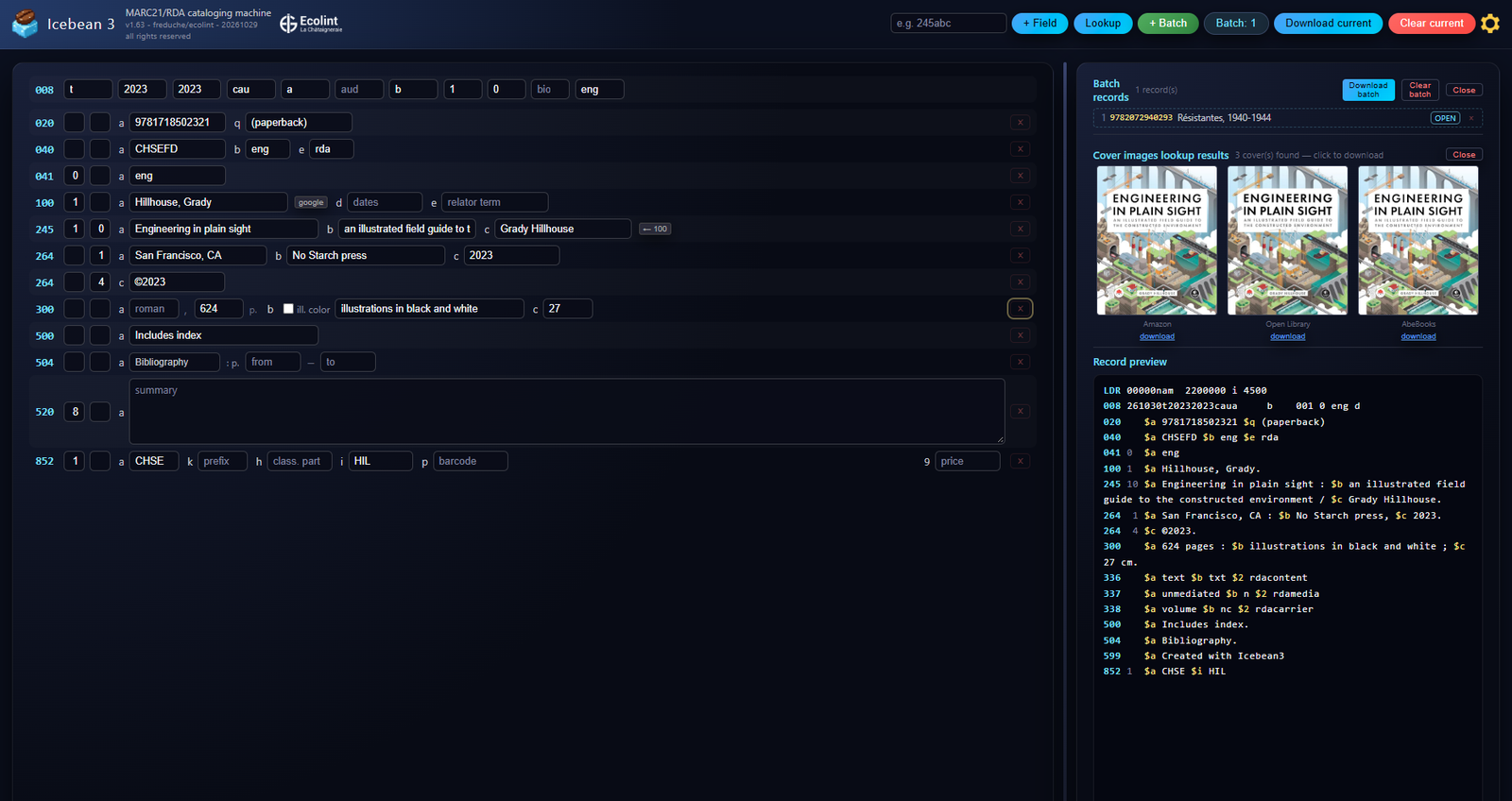
The cataloging screen has three parts.
- The header is the bar across the top. On the left are the name, the version, and the Ecolint mark. To the right of that mark, on two lines, are User manual and Mandarin FAQ. On the right are the controls you use for every book: the field box and + Field, Lookup, + Batch, the Batch count, Download current, Clear current, and the settings gear.
- The record fills the left side. The 008 boxes are one row at the top. Under them, the variable fields run in tag order: 020, 040, 100, 245, 264, 300, 852, and any others you have added. Each row shows the tag, the two indicators, the subfields, and a red × that removes the field.
- The right-hand column is what the record looks like once it leaves the form. When a batch is open, the queue is at the top. Under it, cover images for the current ISBN. Under those, the record preview: leader, 008, your fields with ISBD punctuation, and the fields Icebean adds by itself. When lookup is activated, this is where the retrieved data are displayed for you to apply. The hint for the box you are in appears in this column as well. Drag the divider to give either side more room.
You catalog one book at a time. Nothing is sent to the catalogue until you download a .mrc file and import it.
1. How a record is built
Icebean 3 catalogs one book at a time. You edit a working record on the left. The panel on the right is the record that will be written to the file: the same fields, plus punctuation, plus a few fields the program adds itself. Nothing is sent to the ILS until you download a .mrc file and import it.
The working record has two layers.
- 008 is the fixed field across the top. It describes the book in coded form: date type, dates, place, illustrations, audience, content, index, literary form, biography, and language. Those codes act as switches for the rest of the record, sparing you from the task of typing some if the details in many main Marc fields. Change the language and the thesaurus, relator terms, binding words, and several notes change with it. Change the date type and the 264 fields are rebuilt.
-
Variable fields (020, 100, 245, 264, 300, 6xx, 852, and any other tag you insert): each field has two indicators and one or more subfields, which are compliant with MARC 21 as described on the LOC website. You add a field by typing a pattern such as
245abc. Any field that is documented in MARC 21 can be added. Non-repeatable fields cannot be added twice.
Cataloging a book goes through five stages.
- Frame the record in 008. Language, place, date type, and literary form do the most work. Set them before you spend time on 264 and 6xx, because changing them later rewrites fields that depend on them.
- The ISBN number is the key to automation. Type it in 020$a. Lookup (or Ctrl+Enter) retrieves bibliographic data from these services, in parallel: Open Library, Google Books, the BnF SRU catalogue, the Library of Congress, the British National Bibliography, and Brown’s BFS. Leaving 020$a also fetches cover images from these services: Amazon, Open Library, AbeBooks, and Google Books. One service failing does not cancel the others.
- Accept, then correct. Lookup does not overwrite the record by itself. Each hit is a suggestion. You apply the ones that match this edition. Lazy fill is the exception: it applies a reviewed set of suggestions in one step, and you still check the result.
- Finish access points and the shelf. Subject headings come from FAST or RAMEAU, depending on the 008 language. The call number in 852 is partly calculated from literary form (h, k) and the main entry (i).
- Keep the record. Download the current record, or add it to the batch and download the batch when the sitting is done. Then clear the screen and start the next book.
The preview is the authority for what the file will contain. ISBD punctuation (the space-colon before a publisher, the slash before a statement of responsibility, the final period) is added there and in the file. It is not stored back into the boxes you type in. The same is true of 25 cm in 300$c and p12.5chf in 852$9: you type the number, the file gets the formatted form.
Text you paste into a summary is cleaned only on the way out. A line break becomes a space. Curly quotes, dashes, and ellipses become plain ASCII. Control characters are dropped. The box on the left can still show the paste as you left it. The preview and the .mrc file show the cleaned sentence. That cleaning is what keeps a line break from landing inside a MARC field, where it can stop a web OPAC from displaying the record.
2. Quick start
- Open the app over
httporhttps. Opened as a local file, Lookup still reaches Open Library, Google Books, and BnF, but Brown’s BFS, the Library of Congress, the British National Bibliography, VIAF, and AI do not run. - In 008, set type of date, the year or years, place of publication, and language. Leave index and literary form blank if you are unsure: leaving them blanks them to
0when you move on. - In 020$a, enter a 10- or 13-digit ISBN (13-digit values start with 978 or 979). Tab out of the box to load covers. Press Ctrl+Enter or click Lookup.
- In the suggestions panel, apply the title, statement of responsibility, author, publication, and physical description that match this edition. Use AI subjects for 6xx headings, or Lazy fill when you want a full proposal applied at once. Read the result.
- Check 100$a, 245, 264, 300, and 852 against the book. The preview on the right is the record you are about to save.
- Click + Batch to queue it, or Download current to save
record.mrcimmediately. - Click Clear current, confirm, and catalog the next book. When the queue is complete, open Batch: N and click Download batch.
3. The screen
Header
- Field box and + Field insert a field from a pattern. Enter in the box does the same thing.
- Lookup fetches bibliographic suggestions for the ISBN in 020$a. The button stays disabled until that ISBN is valid.
- + Batch stores the current record. If you opened a batch item for editing, the button reads Update #N and overwrites that slot. Shift+click always appends a new item.
- Batch: N opens the batch list in the right-hand panel.
- Download current saves this record as
record.mrc. - Clear current asks for confirmation, drops the link to any batch slot you were editing, and starts a new record with the default fields. Focus returns to 008 type of date.
- Settings (the gear) holds defaults, rates, theme, analytics, the draft discard button, and this manual.
- The status text beside the controls reports the last action.
The title in the header opens the short quick-reference hint. The logo opens a LinkedIn page in a new tab. To the right of the Ecolint mark, on two lines, User manual opens this page, and Mandarin FAQ opens icebean.online/manfaq. Both open in a new tab.
Left side
The 008 boxes are a single row. Under them, variable fields are listed in tag order. A red × on a field removes it. Indicators are the two small boxes after the tag.
Right side
The hint panel explains the box you are in. Under it, the live preview shows leader, 008, your fields, and the implicit fields. Drag the divider between the two sides; the position is remembered. The suggestions panel and the batch panel open in this same column.
4. Shortcuts
These work from anywhere on the cataloging screen, except where a box has its own key (the field box, and an open autocomplete list).
| Shortcut | Action |
|---|---|
| Ctrl+Insert | Focus the field box so you can add a field. Leaves subfield mode. The placeholder returns to a pattern such as 245abc. |
| Enter | In the field box: add the field described by the pattern. In subfield mode: add the typed subfield codes to the remembered field. In an autocomplete list: accept the highlighted heading. |
| Escape | In the field box: cancel subfield mode. In an autocomplete list: close the list. |
| Ctrl+Delete | Remove the field that contains the cursor, then focus the field box. |
| Ctrl+Shift+Insert | Start subfield mode for the field that contains the cursor. The field box asks for codes such as xz. Press Enter to add them. |
| Ctrl+Shift+Delete | Remove the subfield box that has focus. |
| Ctrl+Enter | Run ISBN Lookup, if 020$a holds a valid ISBN. |
| Ctrl+Shift+Enter | Run Lookup, then Lazy fill, in that order. |
| Arrow up / Arrow down | Move through an open FAST, RAMEAU, or name-authority list. |
| Tab | In an open autocomplete list: accept the highlighted heading. Elsewhere: move to the next box, as usual. |
Shift+click on + Batch or Update #N always adds a new batch item, even when a slot is open for editing.
Adding a subfield from the keyboard
- Click any box in the field that should gain the subfield.
- Press Ctrl+Shift+Insert.
- Type the codes, for example
xz, and press Enter.
5. Fixed field 008

008 is forty characters. You edit the positions that matter for books. The entered-on date (today) is filled in by the program and is not shown as its own box. Each box accepts a code from its list or a code you type. Invalid codes are outlined when you leave the box. A two-letter place code in lowercase is padded with a leading space so it becomes a three-character MARC country code.
| Box | 008 positions | What you enter |
|---|---|---|
| Type of date | 06 | s single date, t publication and copyright, r reprint and original. Other MARC date types are accepted. The usual choices in the list are t, r, and s. |
| Date 1 | 07–10 | Four-digit year. |
| Date 2 | 11–14 | Four-digit year. Hidden when type of date is s. |
| Place | 15–17 | MARC country code, for example enk, fr, sz, nyu. |
| Illustrations | 18–21 | Up to four codes. Common patterns: a, b, ab, abf. f means plates. The code | is ignored. |
| Audience | 22 | j juvenile, d adolescent, or another legal audience code. |
| Content | 24–27 | Up to four nature-of-contents codes. b bibliography, 6 comics or graphic novels, 6b both. |
| Index | 31 | 0 or 1. Left empty, it becomes 0 when you leave the box. |
| Literary form | 33 | 0 non-fiction, 1 fiction, d drama, j short stories, p poetry, and the other legal codes. Left empty, it becomes 0 when you leave the box. |
| Biography | 34 | a autobiography, b biography, c collective, d contains biographical information. |
| Language | 35–37 | Three-letter code. The list offers eng, fre, ger, spa, ita, mul. You can type another MARC language code. |
Language is the switch between English and French wording, and between FAST and RAMEAU. fre selects French. Every other code selects English and FAST.
6. Adding and removing fields

A pattern is a three-digit tag plus the subfield codes you want. 245abc creates 245 with $a, $b, and $c. 650a creates 650 $a (and $2, because subject fields carry a thesaurus code by default). A tag alone, such as 020, uses that field’s default subfields.
Only tags and subfields defined for MARC 21 bibliographic records are accepted. A non-repeatable tag (245, 100, 040, 008, and others of that class) cannot be added twice. The status line explains the refusal. Repeatable tags, including 6xx, 700, and 264, can appear more than once.
Indicators start from the field’s defaults. You can type over them. Some are then set again by the program: 245 indicator 1 from the presence of a 100 or 110, 245 and 240 indicator 2 from a leading article, and 100 and 700 indicator 1 from the shape of the name.
Subfields $2 and $9 are kept at the right end of the field. In 852 the working order is $a, $k, $h, $i, $p, then $9.
A new record opens with these fields already on screen: 020aq, 040abe, 041a, 100ade, 245abc, 264 (from the date type), 300abc, 520a, 852akhip9.
7. What 008 fills in
| When you set | The program |
|---|---|
| Language | 040$b and 041$a; the wording of 020$q, 250$a, 300$b, relator terms, and 504 labels; 6xx $2 (ram if fre, otherwise fast); French or English text in the generated 500, 504, and 655 fields; the 852$h letter for fiction. |
| Type of date |
Rebuilds 264. s: one 264, indicator 2 = 1, $c = date 1. t: publication 264 (indicator 2 = 1, $c = date 1) and copyright 264 (indicator 2 = 4, $c = ©date 2). r: three 264s (manufacture or reprint indicator 2 = 3 with date 1, publication indicator 2 = 1 with date 2, copyright indicator 2 = 4 with ©date 2). Any other type: one publication 264.
|
| Illustrations | 300$b, and the plates box in 300$a when the code includes f. See the 300 section. |
Audience j or d |
A 655. English: Juvenile works or Young adult works. French, for either code: Ouvrages pour la jeunesse. |
Content contains b |
A 504 bibliography note. |
Content contains 6 |
A 655 Graphic novels or Bandes dessinées, and 852$k = BD. The file also gains a second 336 for still image. |
Index 1 |
A 500: Includes index or Comprend un index. |
| Literary form |
A 655 and, for fiction, 852$h. 1 Fiction / Roman. d Drama / Théâtre. p Poetry / Poésie. j Short stories / Nouvelles. 852$h for 1 and j: F by default, R in French, 833 German, 863 Spanish, 853 Italian. Short stories use FS when the language is not one of those four.
|
Biography a or b |
A 655. English: Autobiographies or Biographies. French, for either: Biographie. |
Generated 500, 504, and 655 fields are replaced when you change the 008 code that created them. A 655 you added yourself, with its own heading, is left alone. Literary-form 852$h is protected when you apply a lookup suggestion: the 008 rule wins over an imported class number.
8. Field guide
020 ISBN
$a is checked as ISBN-10 or ISBN-13. A 13-digit number must start with 978 or 979. An invalid value is outlined in red, and Lookup stays off. $q offers a binding qualifier. In English: (paperback), (hardback). In French: (broché), (cartonné), (relié). Imported bindings are reduced to one of those five forms.
040 Cataloging source
$a is your cataloger code. The Settings value is reused on the next record. $b follows 008 language (fre or eng). $e defaults to rda.
041 Language
$a follows 008 language. If you set indicator 1 to 1 (the item is a translation), $h is added for the original language, and a 240 is created with $a and $l. Setting indicator 1 back removes that automatic 240.
100 and 700 Personal names
Indicator 1 becomes 1 for an inverted name (Filiu, Jean-Pierre) and 0 for a direct name (Homer, Peyo). This is applied when you type, when you pick a name from the authority list, and when you apply a suggestion. $d holds dates. A heading that arrives as Surname, Forename, 1963- is split so the dates land in $d.
$e is a relator term. The list is the English or French set according to 008 language. The hint for $e includes links to the ABES function-code lists. A google button on 100$a and 700$a searches the name in a new tab.
100$a also feeds 852$i: the first three letters, uppercased, skipping characters that are not A–Z. Orwell gives OWE. Filiu, Jean-Pierre gives FIL.
110 and 710 Corporate names
110 defaults to indicator 1 = 2 and subfield $a. 110$a and 710$a use the same name-authority search as personal names. A record with 110$a and no 100$a is treated as having a main entry: 245 indicator 1 becomes 1, and the batch warning does not ask for 100$a.
240 and 245 Titles
245 indicator 1 is 1 when a 100 or 110 exists, and 0 when it does not. Indicator 2 of 240 and 245 is the number of characters to skip for a leading article, in English, French, Spanish, Italian, or German. The machine gives 4. L'histoire counts through the apostrophe. Opening quotes are ignored before the article is measured.
245$c has a ← 100 button. It copies 100$a into direct order: Burke, Jason becomes Jason Burke.
250 Edition
$a offers Second edition and Third edition, or Seconde édition and Troisième édition when the language is French. You can type any other statement.
264 Publication
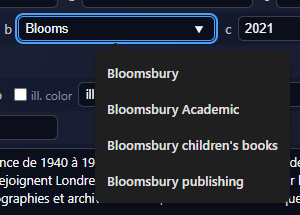
$a and $b offer places and publishers from the built-in list. Choosing a publisher fills the matching place. When a publisher has a UK and a US form, 008 place decides: a UK code prefers London, a US code prefers New York. Typing in the first 264$a or $b copies that value into the later 264s. Imported places and publishers are matched to the list when the names are close; otherwise the imported text is kept.
The copyright date is stored with a copyright sign in $c of the 264 whose indicator 2 is 4. You do not type the sign yourself when the date type is t or r.
300 Physical description
$a is three boxes: roman numerals, pages, and plates. The plates box appears when 008 illustrations includes f. The file joins them, for example xviii, 256 pages, 16 pages of plates. In French the plates phrase is pages de planches.
$b is calculated from 008 illustrations and then shown in an editable box. Illustrations (a) and maps (b) each have a colour checkbox. Unchecked means black and white; checked means in colour. The same qualifier is combined: illustrations and maps in colour. Further codes add their own terms, in English or French: portraits, charts, plans, music, facsimiles, coats of arms, genealogical tables, forms, samples, sound discs, photographs, illuminations. If you edit $b by hand, that text stays until you toggle a colour checkbox, which recalculates it.
$c is the height in centimetres as a number. The preview and the file say 25 cm.
500, 504, 505, 520 Notes
500 for the index is created from 008, as described above. You can also insert a 500 yourself.
504$a is a label plus a page range. The default label is Bibliography or Bibliographie. English suggestions: Bibliography, Further reading, Bibliographical notes, References. French suggestions: Bibliographie, Notes bibliographiques. You can type another label. The label follows 008 language unless you have already chosen a custom one.
505$a and 520$a are taller text boxes, meant for contents and summary. Paste is allowed. Line breaks in that paste become spaces in the preview and in the file.
6xx Subject access
See the next section. Default indicator 2 is 7, and $2 is fast or ram.
852 Location
$a is the holding library. The Settings default is reused; otherwise the built-in value is CHSE. $k is BD when 008 content includes 6, and blank otherwise. $h follows literary form, as in the 008 table, and you can type a Dewey number over it. $i is the three-letter cutter from 100$a. $p is the barcode. $9 is the price as a number; the file writes p, the amount, and the target currency in lowercase, for example p12.5chf.
$j is not on the form. If $h begins with digits, the file adds $j as DCX plus those digits padded to three places. 956.94 gives DCX956. A letter class such as F or R does not produce $j.
9. Subjects and names
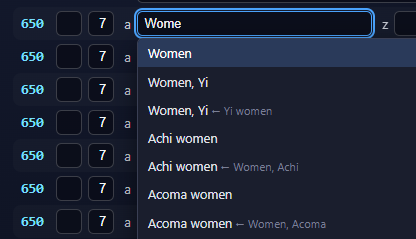
Type at least two characters in a heading box. A list opens. Arrow keys move, Enter or Tab accepts, Escape closes, and a click accepts.
When 008 language is not French
FAST is the thesaurus and $2 is fast.
| Field | Source |
|---|---|
| 655 $a | Local FAST form/genre list. Works without a network. |
| 650 | FAST topical |
| 651 | FAST geographic |
| 600 | FAST personal names |
| 610 | FAST corporate names |
| 611 | FAST meetings |
| 630 $a and 630 $t | FAST titles |
| 647, 648 | FAST, all facets |
A FAST heading can bring subdivisions with it ($d, $x, $v, $y, $z). Up to 50 hits are requested.
When 008 language is French
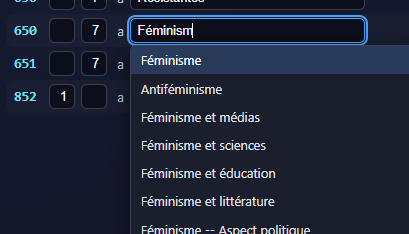
RAMEAU via IdRef is the thesaurus and $2 is ram. 655 $a uses the local RAMEAU form/genre list and works offline. The other tags query IdRef. A heading that contains -- is split into $a and $x. On a personal name, a parenthetical date at the end is moved to $d.
Name authorities for 100, 700, 110, and 710
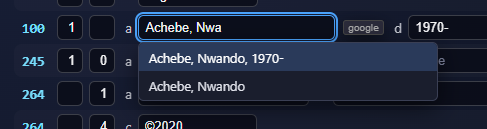
The same two-character lookup runs on $a, independent of ISBN Lookup. Settings chooses IdRef or VIAF. VIAF goes through the local api/api_viaf.php proxy. If VIAF fails, the search falls back to IdRef. A picked name sets indicator 1, and dates in the heading are split into $d.
10. ISBN lookup
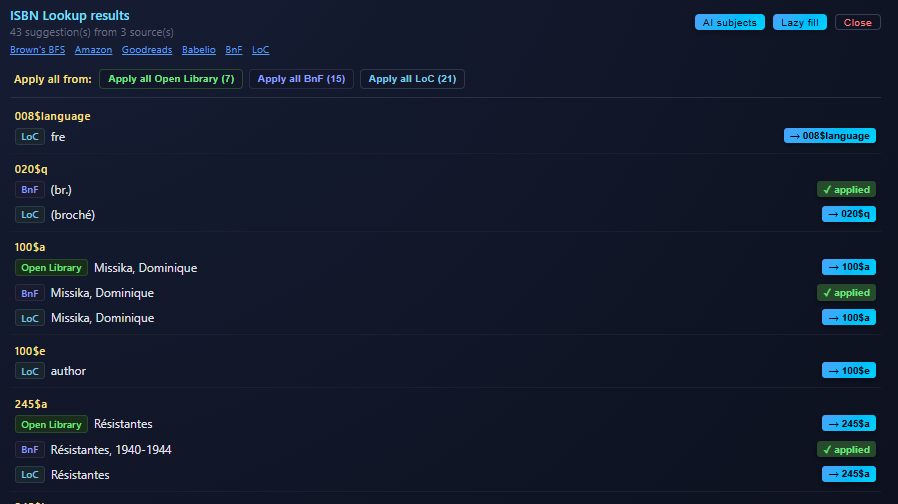
Lookup reads 020$a and queries, in parallel, Open Library, Google Books, the BnF SRU catalogue, the Library of Congress, the British National Bibliography, and Brown’s BFS. One source failing does not cancel the others. Results open on the right, each row labeled with its source: OL, GB, BnF, LoC, BNB, BBFS. You can apply every row from one source at once, or a single row.
Applying a value creates the field if it is missing. A repeatable 6xx or 700 whose $a is already filled becomes a new field, so several subjects stay separate. 264$a and 264$b applied to the first 264 are copied to the later ones. A date applied to 264$c goes to the publication 264 (indicator 2 = 1) and can set 008 date 1. Pages are parsed into the roman / pages / plates boxes.
Library of Congress may return several records for one ISBN search. Only the record whose 020$a matches the ISBN you typed is used. Related ISBNs in 020$z are ignored. When the browser cannot call LoC directly, the request goes through api/api_loc.php on the same server.
BnF names and titles are converted from UNIMARC. Secondary contributors become 700 fields, with dates in $d and a French relator in $e when a role code is present. A parallel title in UNIMARC 200$d becomes 246$a. Statement-of-responsibility parts in 200$f and 200$g are joined into 245$c.
Prices from BnF (euro) and Brown’s BFS are converted toward the target currency in Settings. The suggestion shows the source amount, the rate, and the rounding to the nearest 0.5. The value written to 852$9 is only the formatted price.
Under the suggestions title, links open the same ISBN at Brown’s BFS, Amazon.fr, Goodreads, Babelio, BnF, and the Library of Congress. BnF uses the ARK when the search found one. LoC uses the LCCN when it found one.
11. AI subjects and Lazy fill
Both buttons sit on the suggestions panel and need the server script api/api_ai.php. They are assistive. Indicators, thesaurus, and subfield placement still need a cataloger’s eye before export.
- AI subjects asks only for subject access fields.
- Lazy fill asks for a full-record proposal. It merges what Lookup already found, the subject suggestions, and that proposal, drops duplicates, and applies the set. Ctrl+Shift+Enter runs Lookup and then Lazy fill.
For a French record the subject request prefers RAMEAU headings. Personal names in 100$a and 700$a are kept when they match an IdRef or BnF authority result. Subject headings are checked against FAST or RAMEAU, including the local form/genre lists. Places and publishers are aligned to the built-in list. Pages and dimensions are reduced to numbers. Bindings are reduced to the five canonical $q values. Dates stuck in a personal-name $a are moved to $d. An inverted geographic heading such as Dorset (England) becomes 651 $a England and $z Dorset.
$2 is not offered as its own AI row. It follows the 008 language when the heading is applied. Subdivisions travel with the heading. A date-like subdivision is put in $y.
12. Cover images
Leaving a valid 020$a fetches covers from Amazon, Open Library, AbeBooks, and Google Books. They appear in the preview at 150 pixels wide. Click an image or its download link to save {ISBN}_{source}.jpg, resized to 150 pixels. Tiny Amazon placeholders are discarded. Clear removes the covers from the panel. Covers are not part of the MARC record.
13. Preview and the .mrc file
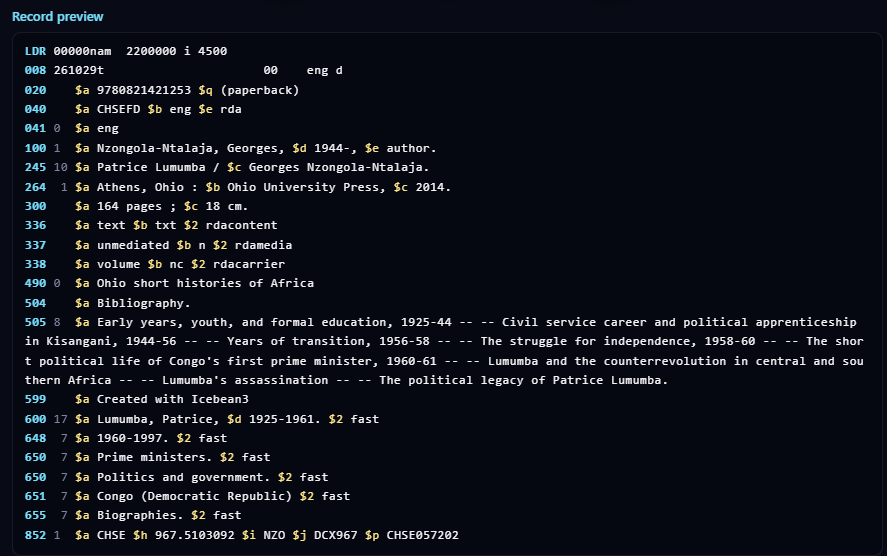
Download current writes record.mrc, one ISO 2709 record, MARC-8 encoded. Leader position 09 is blank, which means MARC-8. Accented letters are stored as a MARC-8 diacritic before the base letter. The copyright sign has its own MARC-8 byte.
On the way into the preview and the file, field text is normalized:
- Line breaks become a single space.
- Curly single and double quotes become
'and". - Dashes of several kinds become
-, and an ellipsis becomes.... - Control characters are removed. They are never written as raw bytes inside a field.
Characters that still have no MARC-8 mapping are written as a question mark. Guillemets are in that group. If a summary must keep them, retype the sentence with ASCII quotes before you download.
Punctuation
Preceding punctuation is attached to the previous subfield: a colon before 264$b, a slash before 245$c, a semicolon before 300$c, and the other ISBD marks defined for the tag. A space is inserted before : ; / and +. Terminal punctuation, usually a period, is added to the last content subfield. $2 and $9 do not receive that period. A value that already ends with . ! ? ) or ] is left as it is.
Fields you do not type
- 336 $a text $b txt $2 rdacontent, always.
- 336 $a still image $b sti $2 rdacontent, when 008 content includes
6. - 337 $a unmediated $b n $2 rdamedia, always.
- 338 $a volume $b nc $2 rdacarrier, always.
- 599 $a Created with Icebean3, always.
- 852$j, when $h starts with a number, as described in the 852 section.
14. Batch
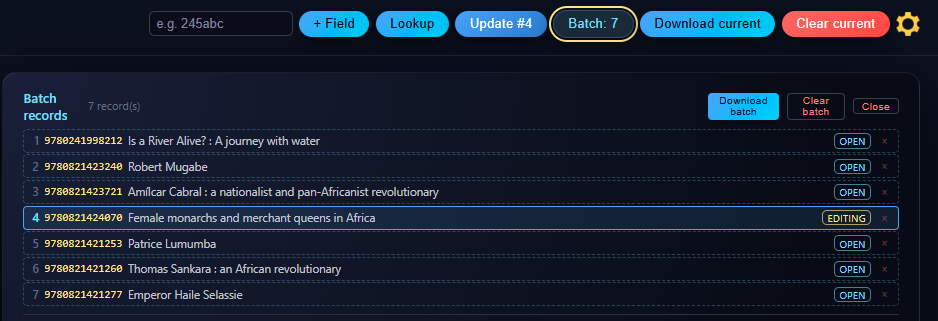
+ Batch builds the MARC bytes and stores them with a snapshot of the editable record. The queue lives in this browser and survives a refresh. The badge shows the count. Open the list to see ISBN and title, to remove one item, to download, or to clear the whole queue. Clearing asks for confirmation.
Click a row to load that book back into the editor. The row is marked editing, and the header button becomes Update #N. A normal click then overwrites that slot, bytes and snapshot together. Shift+click appends instead. Clear current forgets which slot was open, so the next click adds a new item. An older batch item that has bytes but no snapshot cannot be reopened.
Before the record is stored, Icebean warns if any of these are empty: 245$a, 245$c, 100$a or 110$a, 020$a, 300$a, 300$c, 264$a, 264$b, 264$c, 852$h, 852$i, 852$9. You can continue anyway or go back. An empty screen (no ISBN and no title) is refused.
Download batch concatenates every stored record into batch_N_records.mrc. The timer in Settings records how long the book took, at the moment you add it.
15. Draft recovery
The record you are typing is saved locally as you work, including when you hide the tab or leave the page. On the next visit, if that draft differs from a blank record, Icebean asks Restore unsaved draft from previous session? Declining leaves the draft stored until you discard it or clear the record. Clear current discards the draft. Settings has Discard saved draft for the same purpose while you keep the record that is on screen.
16. Settings
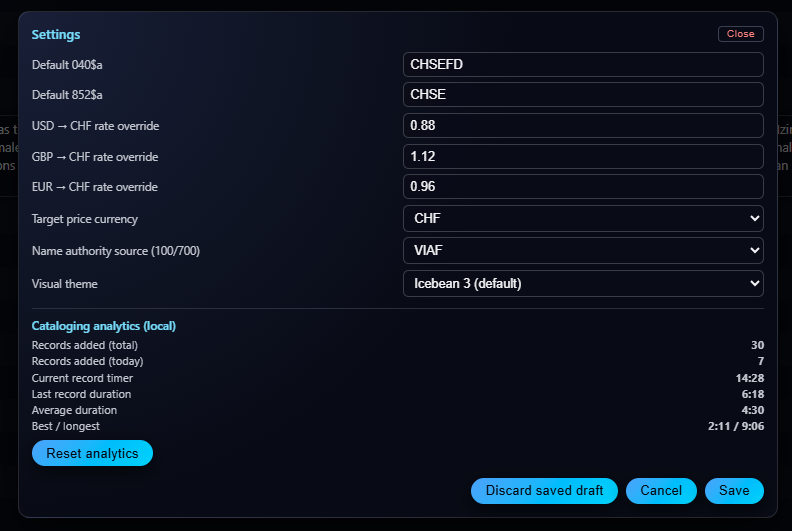
Open the gear in the header. Save writes the values. Cancel closes without writing. Clicking the dark area around the panel also closes it.
- Default 040$a. Cataloger code copied into new 040 fields.
- Default 852$a. Library code copied into new 852 fields. Empty means the built-in
CHSE. - USD, GBP, and EUR rates. How many CHF one unit of that currency buys. Used when a BnF or BFS price is converted. A value equal to the built-in rate is not stored as a personal override.
- Target price currency. CHF, USD, GBP, or EUR. 852$9 is written in this currency, rounded to the nearest 0.5.
- Name authority source. IdRef or VIAF, for 100, 700, 110, and 710.
- Visual theme. Icebean 3, or the lighter Icebean 2 colours.
- User manual. Opens this page in a new tab. The record on the cataloging screen stays as it was.
- Cataloging analytics. Records added in total and today; the timer for the book you are in; last, average, best, and longest times. The timer starts at the first real edit after a clear, not while the screen is still the blank default. The average ignores records that took more than ten minutes. Reset clears the counters.
- Discard saved draft. Deletes the recovery copy. Asks for confirmation.
17. Hints
The panel above the preview describes the 008 box or the subfield that has focus. Many hints include a link, for language codes, country codes, and relator terms. The hint stays up long enough for you to move the pointer onto the link. Click the application title to show the short quick-reference again. This manual is the full text; the hint is the reminder.
18. What stays on this computer
These are kept in the browser’s local storage for this site. They are not in the MARC file.
- The batch queue.
- The unsaved draft.
- Settings: cataloger code, library code, rates, target currency, name source, theme.
- Analytics counters and timers.
- The position of the preview divider.
Clearing the browser’s data for the site removes them. Another browser, or another computer, starts empty.